SimplePractice Availability
SimplePractice is software that helps therapists and other clinicians run their practices. It brings everyday work like managing appointments and client information into one place.
Therapists can offer appointment times for clients to request online. Those hours need to fit around the rest of their day, but setting them up meant switching to a separate availability view, away from the calendar where they managed appointments and other commitments.
I ran user research and designed an integrated calendar view where clinicians could manage availability alongside their appointments and events.
Problem and opportunity
In August and September 2024, about 7% of appointment requests were declined because of scheduling conflicts. For someone looking for care, that could mean starting their search again.
This project focused on a specific source of confusion: the relationship between calendar events and bookable hours. Of 23 related support tickets we reviewed, 13 involved clinicians who didn't realize calendar events blocked their availability. Bringing the views together could make that relationship easier to understand and help clinicians keep their availability current.
Solution
I explored putting appointments in the availability view and bringing availability into the main calendar. The main calendar made more sense: it was already where clinicians managed their schedules.
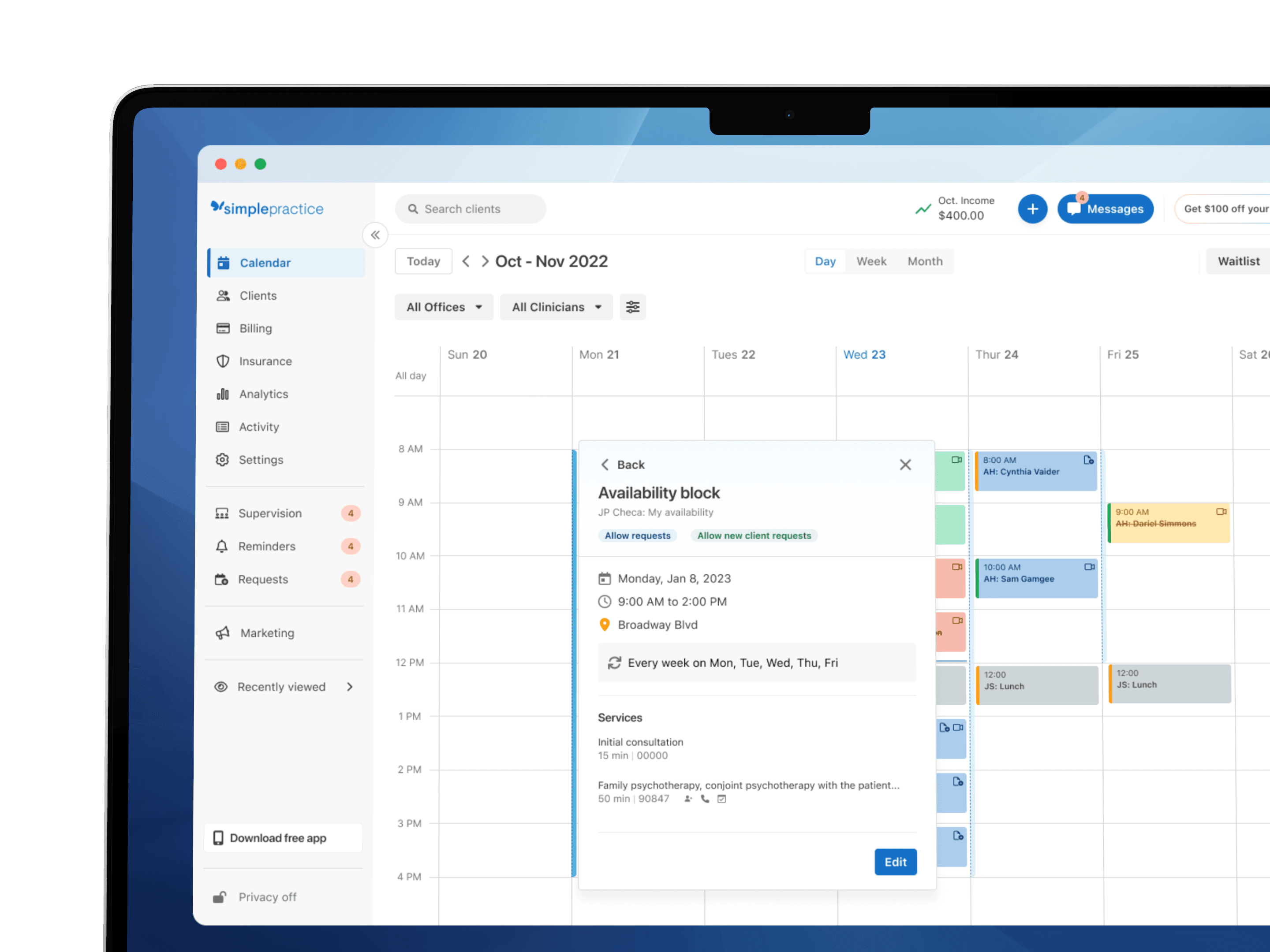
The design put bookable hours beside the events that affected them, with a way to inspect a block, edit it, or create availability directly from the calendar.
Details
Keeping the calendar readable
I explored grouping and layering before choosing narrow blue bars along the left side of each calendar column. These interactive bars showed bookable hours and opened their setup details without adding another full layer of event cards.
Previously, clinicians could show availability as white spaces in the calendar grid, with unavailable time grayed out. That treatment was easy to miss. We replaced it with the bars, expecting a clearer display that could also show more of the information behind an availability block.
When blocks overlapped, a list let clinicians choose which one to inspect without leaving the calendar.
Inspect and edit
An open hour didn't mean every appointment would fit. Services, appointment lengths, and booking rules still mattered. I paired the bars with a preview that explained a block and connected to editing, keeping those details within reach without crowding the calendar.
Communicating visibility
In the initial design, clinicians could hide the availability bars to focus on appointments. If they created a block while the bars were hidden, a confirmation explained why it wasn't showing and offered a way to reveal it. Hiding the bars only changed the display; the bookable hours stayed in place.
After release
A few clinicians missed the previous gray-and-white display, so we restored it as an option. Availability now stays visible on the calendar, with clinicians choosing between the familiar grid treatment and the interactive blue bars.
Since launch in 2025, about 96% of users who interact with the availability setting keep it turned on.